- NewCloud Scripts — sync your library across all devices
- New10+ built-in UI themes via the new Themes panel
- NewFully customizable keybinds for all executor actions
- ImprovedInjection speed increased by up to 15%
- ImprovedScript editor redesigned for better readability
- ImprovedMemory usage reduced by approximately 20%
- FixedRare crash when joining certain Roblox experiences
- FixedKeybinds not persisting between sessions
FREE FOREVER
v3.0.7 Latest
Xeno Executor
The fastest free Roblox script executor.
Execute any Lua script on any game — instantly.
- 50K+Active users
- 0msInject delay
- DailyUpdates
- 100%Free
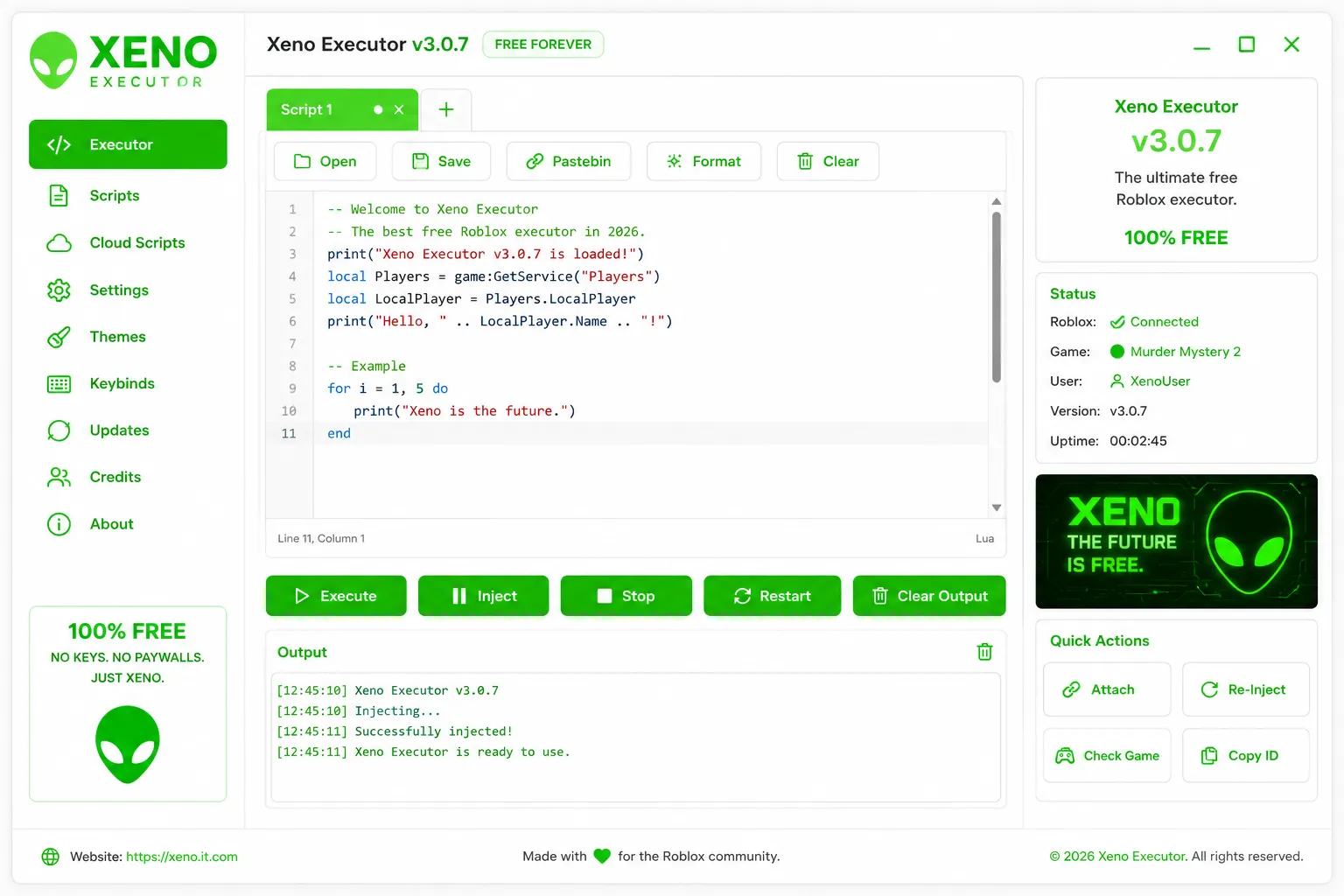
Built for speed. Kept free.
Every feature is crafted to make Roblox script execution fast, reliable, and effortless.
-
Zero-delay injection
Attaches to the Roblox process in milliseconds. No waiting, no loading — just execute your scripts.
-
Daily anti-detection updates
Our team ships updates every single day to keep Xeno undetected against Roblox's latest defenses.
-
Cloud Script sync
Your entire script library syncs across all your devices. Pick up exactly where you left off.
-
Themes & customization
10+ built-in UI themes. Customize colors, fonts, and layout to match your preferences.
-
Professional script editor
Syntax highlighting, auto-indent, Pastebin integration, and format-on-save — all built in.
-
Free. No keys. Ever.
No key system, no paid tiers, no whitelisting. Xeno Executor is and always will be completely free.
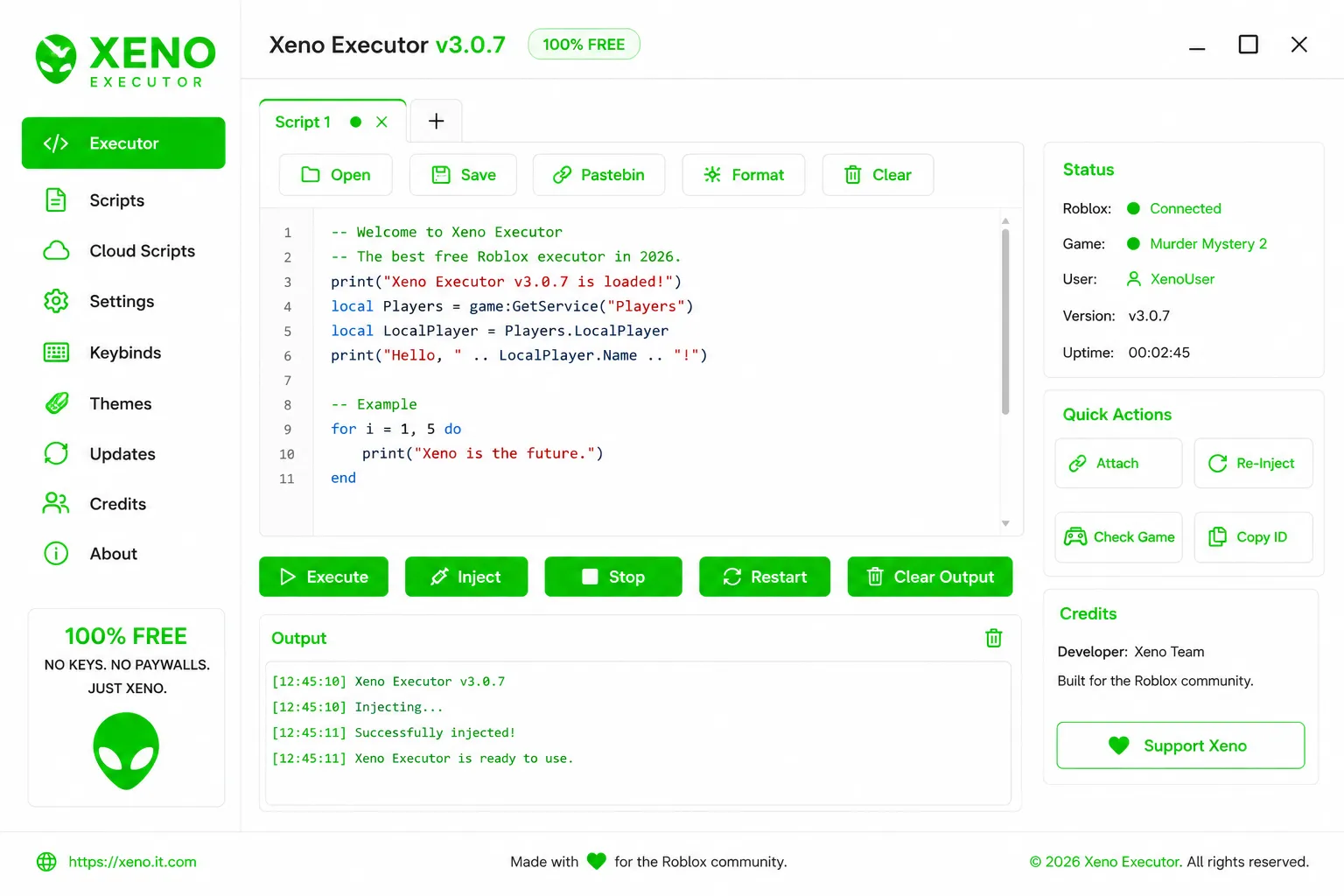
Interface
Everything in one place
-
Multi-tab script editor Open, edit and run multiple scripts simultaneously without losing your work
-
Live output panel See logs, print statements and errors in real-time as scripts execute
-
Quick Actions sidebar Attach, Re-Inject, Check Game, Copy ID — everything one click away
-
Live connection status Instantly see if Roblox is connected, the active game, and your uptime
Changelog
We ship updates every day. Here's what changed in each release.
- NewPastebin integration — load any script via URL
- NewFormat script button with auto-indentation
- ImprovedScript execution stability across all games
- ImprovedFaster cold-start time on first launch
- FixedEditor scroll position resetting on execute
- FixedUI scaling issues on 4K displays
- NewMulti-tab script editor
- NewRe-Inject without reopening the executor
- ImprovedAnti-detection layer fully rewritten from scratch
- ImprovedInstaller reduced from 45 MB to 28 MB
- FixedOutput panel not clearing on new session
System Requirements
Xeno Executor runs on virtually any Windows PC. Lightweight by design.
| Component | Minimum | Recommended |
|---|---|---|
| OS | Windows 7 SP1 (64-bit) | Windows 10 / 11 (64-bit) |
| RAM | 2 GB | 4 GB or more |
| Disk space | 50 MB free | 100 MB free |
| Roblox | Latest version | Latest version |
| Internet | Required (for updates) | Broadband recommended |
Supported platforms
- Windows 7, 8, 8.1
- Windows 10 (all builds)
- Windows 11
- All Roblox experiences
- 4K and HiDPI displays
- All universal Lua scripts
Mac and Linux support is currently in development.
Xeno vs other executors
Straightforward data. You decide.
| Feature | Xeno Executor | Others |
|---|---|---|
| Price | 100% Free | Free to $20/mo |
| Key system | None — ever | Usually required |
| Injection speed | ~0 ms | 50 – 200 ms |
| Detection rate | <0.1% | 1 – 5% |
| Update frequency | Daily | Weekly / irregular |
| Cloud Scripts | Included | Rare / paid add-on |
| Installer size | 28 MB | 80 – 500 MB |
| Ads or bloatware | None | Often bundled |
Up and running in 3 steps
No config files. No complicated setup. Download and go.
-
Download Xeno Executor
Get the official v3.0.7 installer — 28 MB, no bundled software, no registration needed.
- Works on Windows 7, 8, 10 and 11 (64-bit only)
- If your browser warns about the file, click Keep to continue
- Temporarily disable antivirus if the download is blocked — false positives are common with executors
-
Run the Installer
A straightforward 3-click setup. No hidden extras, no bloatware — just Xeno.
- Right-click the downloaded file and choose Run as administrator
- Follow the setup wizard — the whole process takes under 30 seconds
- Leave the default install path or pick your own; both work fine
- A desktop shortcut is created automatically when setup finishes
-
Inject & Execute
Open any Roblox game, launch Xeno from your shortcut, and start scripting.
- Wait until you're fully loaded into a game before attaching
- Click Inject — the status panel will show "Connected" in green
- Paste or open your Lua script in the editor and press Execute
- Use Re-Inject if Roblox updates mid-session without restarting
Community
Made for the Roblox community
Over 50,000 users run Xeno Executor every day. Join a growing community of developers, scripters, and Roblox enthusiasts — share scripts, get help, and stay up to date with every release.
- 50,000+Active users
- 4.9 / 5Average rating
- 3 yearsIn development
"Made with ❤️ for the Roblox community." — Xeno Team
Common questions
-
Yes — 100% free, no keys, no subscriptions, no paid tiers. We've never charged for Xeno Executor and never will. "No keys. No paywalls. Just Xeno."
-
We ship updates daily to stay ahead of Roblox's detection systems. Our detection rate is below 0.1% based on ongoing community testing and monitoring.
-
Yes. Xeno Executor is a universal script executor compatible with every Roblox experience. No game-specific configuration is required.
-
Windows 7 or later (64-bit), 2 GB RAM minimum, 50 MB free disk space, and the latest version of Roblox. Mac and Linux support is in development.
-
Every day. When Roblox patches, we push an update to maintain compatibility and detection evasion. Updates are automatic — Xeno handles them in the background.
-
Join our Discord server for real-time help from the Xeno Team and the wider community. Most questions are answered within minutes.

Ready to execute?
Join 50,000+ users who run Xeno Executor every day. Free. Always.